Malignus does not have a “happiness” slider. It has minions with stats, traits, relationships, needs and a list of specific complaints. Managing them means reading causes, not chasing a single number.
The public build exposes enough to build a routine: a six-stat Status tab, a Dungeon Duties table, a Behavior tab, a Grumbling log and the gear/storage systems. The exact numbers behind work speed, hunger and morale are not published. This guide uses the visible systems and labels its recommendations.
The management loop
Run this loop after every major event — a new room, a completed raid, an invasion, a death. It takes less time than recovering from a morale collapse.
Check the Grumbling log
See what is actually bothering the dungeon before changing anything. The complaint names point at specific systems.
Check the food and beds
A minion who ate on the floor or slept badly has a cause. Fix the room, not the symptom.
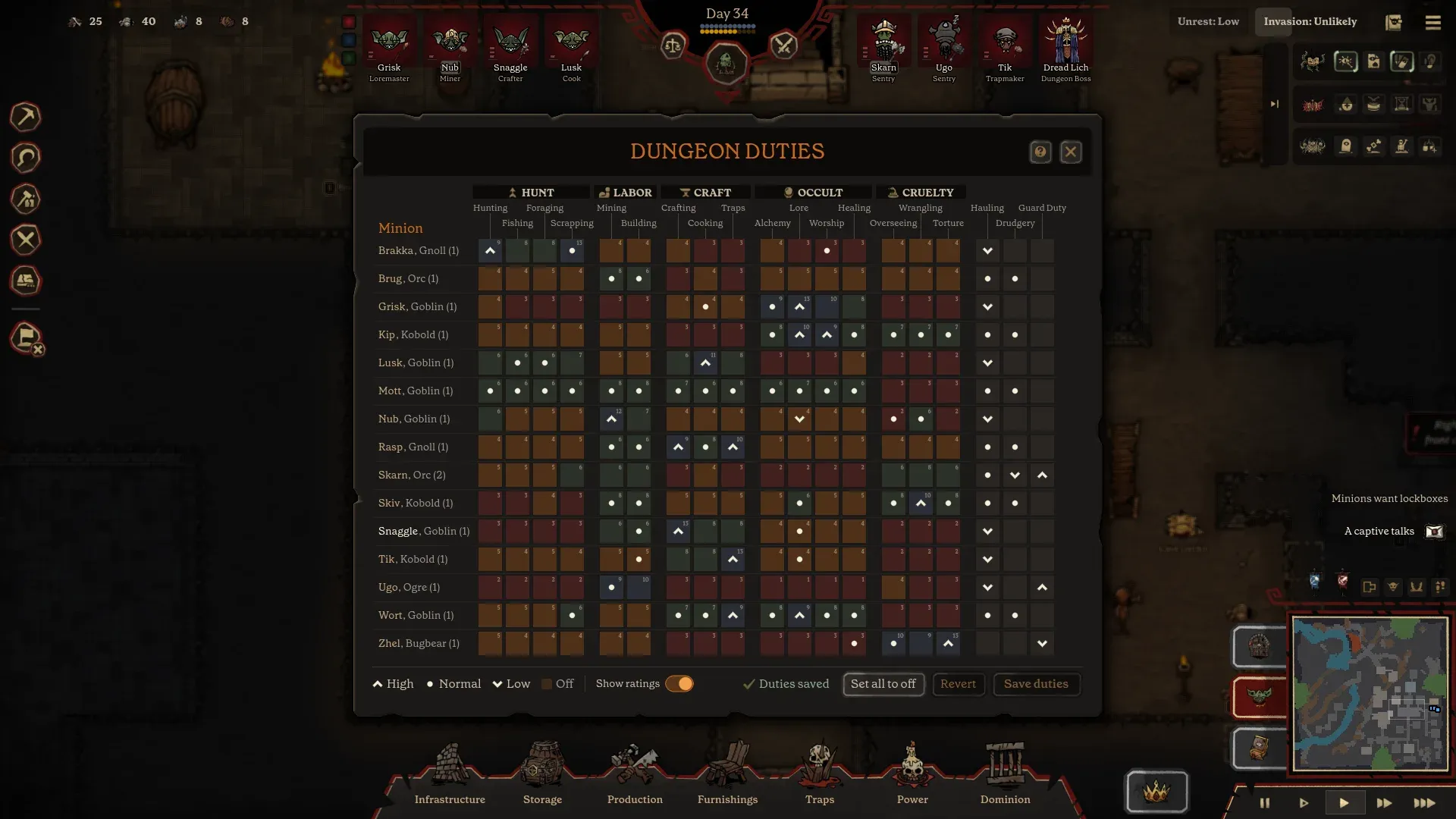
Review the duty matrix
Move one or two people, not the whole table. Look for a job with no owner and a minion with three high priorities.
Review behavior toggles
Non-combatants should not charge invaders. Wounded minions should not be confined to a dangerous job.
Check gear and lockboxes
A minion with no lockbox and no weapon is a complaint and a liability.
Prepare for the next invasion
Replace losses, heal the Boss, restock the corridor and check the Invasion status.
Build a duty matrix
The six stats map to job families. The official duties table groups them under headings: Hunting, Foraging, Fishing and Scrapping under Hunt; Mining and Building under Labor; Crafting, Cooking and Traps under Craft; Lore, Worship and Healing under Occult; Overseeing, Wrangling and Torture under Cruelty. Hauling, Drudgery and Guard Duty appear as separate priority columns without a colored stat heading.
| Principle | What it means | Why it helps |
|---|---|---|
| One primary job | Give each minion one job at high priority and a second at normal. | The duty table is a queue. Five high priorities create a queue with no order. |
| Match stat to work | High Labor to mining/building; high Craft to cooking/crafting/traps; high Occult to lore/worship/healing. | It uses the visible stat signal instead of assigning by portrait. |
| Name an owner for each column | At least one minion should be responsible for food, one for hauling, one for building. | Shared responsibility becomes nobody's responsibility. |
| Keep a flexible hand | One minion with normal priorities across hauling and drudgery. | Production stalls when everyone is specialised and no one moves the output. |
| Use “off” deliberately | Turn off jobs a minion should never do, especially dangerous ones for non-combatants. | A cook should not be on the torture roster or the front line. |
Start with the base, not the spreadsheet
For the first few days, ignore the perfect duty matrix. Cover mining, cooking, hauling and one fighter. Once the basic loop runs, refine. A colony that eats and sleeps is more resilient than one with an elegant set of priorities and no cook.
Behavior settings that save lives
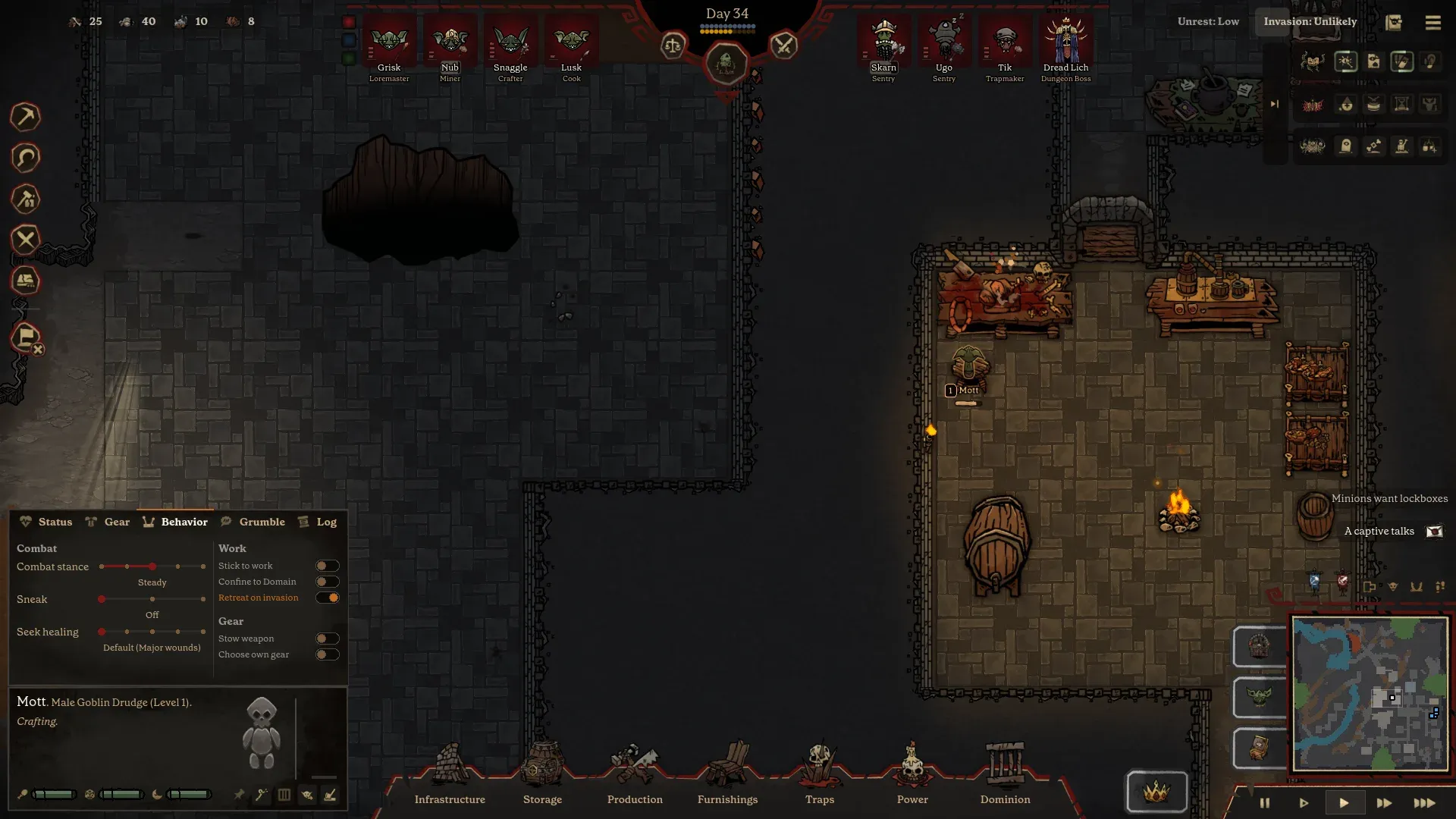
The Behavior tab is where you stop a bad match from becoming a casualty. The official screenshot shows eight controls:
- Combat stance — a slider, set to “Steady” in the example.
- Sneak — toggled off in the example.
- Seek healing — set to “Default (Major wounds).”
- Stick to work — enabled.
- Confine to Domain — enabled.
- Retreat on invasion — enabled.
- Slow weapon — enabled.
- Choose own gear — enabled.
A sensible default for a new player:
- Workers: Stick to work, Confine to Domain, Retreat on invasion. Let them choose their own gear until you have a proper smithy.
- Fighters: Keep them in the domain during a raid, give them a weapon they can use, and set healing at a threshold you can support.
- Scouts or raiders: These toggles matter most in the overworld. The public material does not document separate raid behavior settings, so check the current build before relying on a toggle to apply outside the dungeon.
The grumble ledger
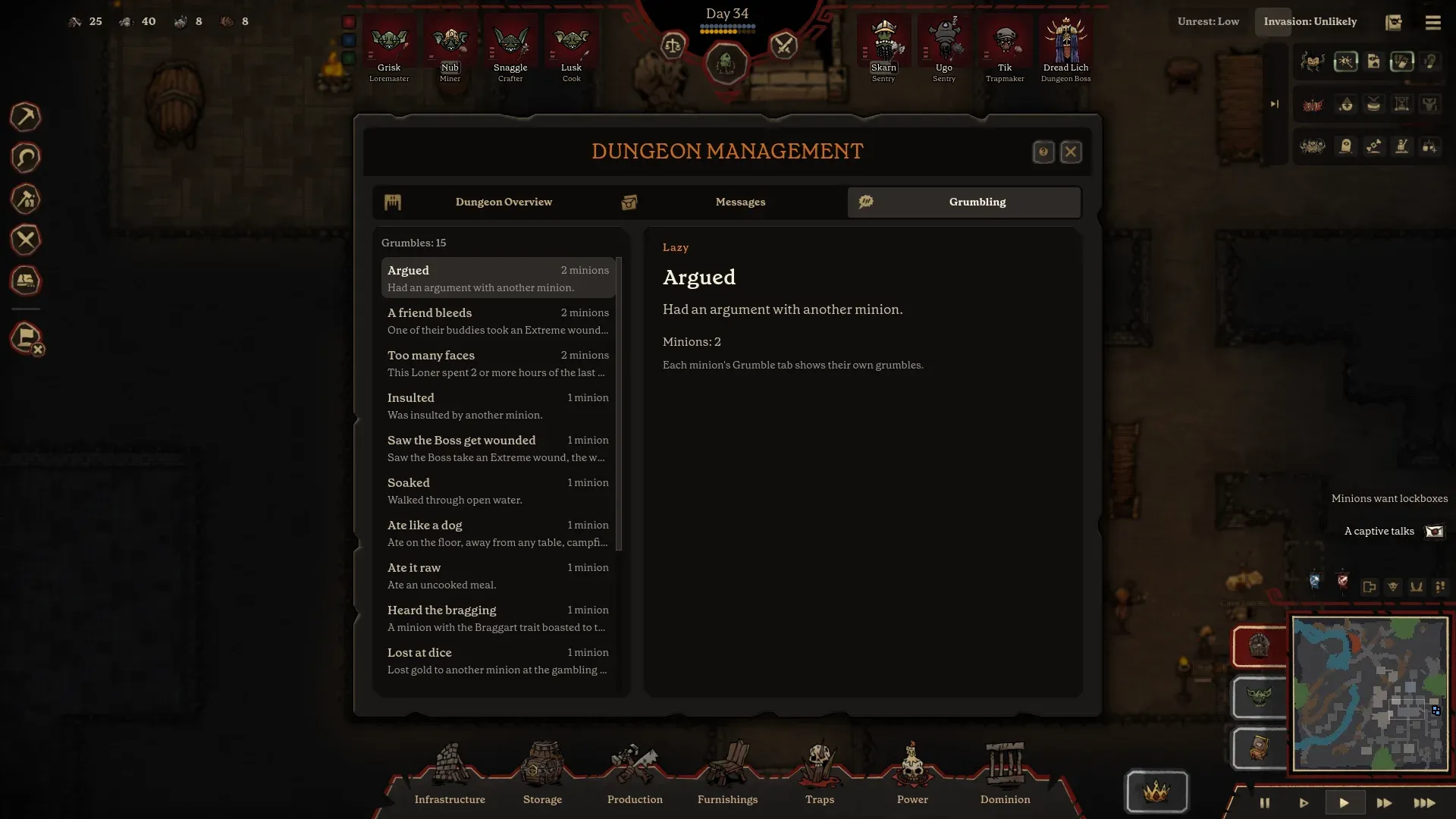
The Grumbling screen is the closest thing to a morale dashboard. It lists complaint types and counts the minions affected. The official screenshot includes:
| Complaint | Text shown | Probable cause | First fix to check |
|---|---|---|---|
| Argued | Had an argument with another minion. | Social conflict, crowding or a nemesis. | Space, work assignments, the buddy/nemesis panel. |
| A friend bleeds | One of their buddies took an Extreme wound. | A dangerous job or a lost fight. | Healing, retreat toggles, job danger. |
| Too many faces | A Loner spent too long around too many minions. | The Loner trait plus crowding. | Quarters layout, quieter work assignments. |
| Saw the Boss get wounded | The Boss took an Extreme wound. | Boss exposed in combat. | Boss positioning, bodyguards, healing. |
| Ate like a dog | Ate on the floor, away from any table or campfire. | No table or no reachable dining space. | Dining tables near the kitchen. |
| Ate it raw | Ate an uncooked meal. | No cook or no cooking station. | Cooking table, recipe queue, cook assignment. |
| Lost at dice | Lost gold to another minion at the gambling table. | Gambling is a social activity with a cost. | Decide whether the morale benefit is worth the gold. |
The causes column is editorial. The complaint text is from the official UI. The point is to treat each grumble as a diagnostic signal: the game is telling you which subsystem to inspect.
Relationships and morale
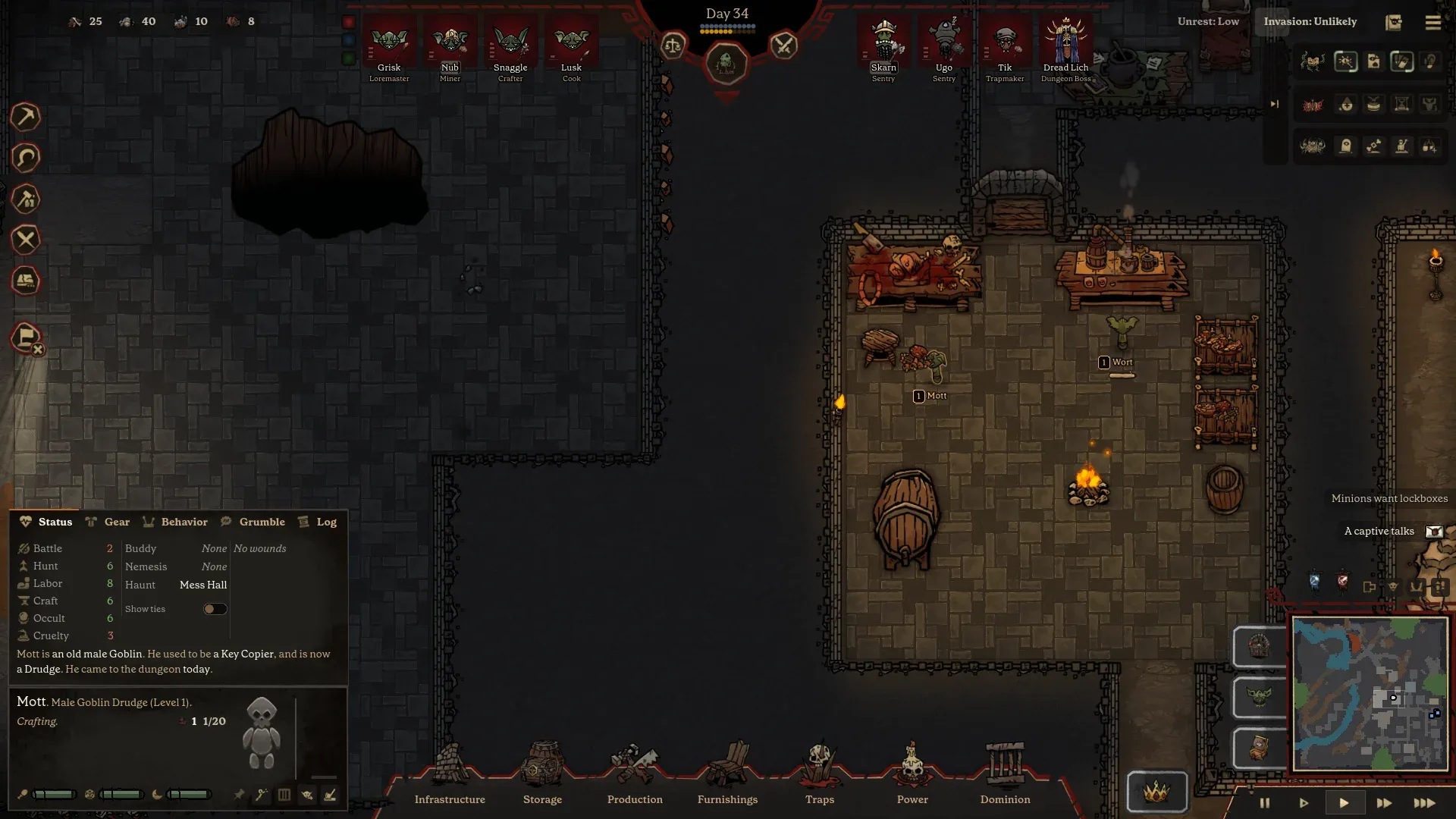
The Status tab shows a buddy and a nemesis for each minion, plus a favorite haunt and a short life story. The public material does not explain how these relationships form or what exact bonuses they give. What is clear is that relationships are part of the simulation, not a cosmetic label.
Practical implications:
- Do not split a buddy pair across a dangerous and a safe job without thinking. “A friend bleeds” is a confirmed grumble.
- Watch nemeses in shared rooms. “Argued” and “Insulted” are confirmed complaints, and crowding can amplify them.
- Use the favorite haunt as a placement hint. If a minion's favorite haunt is the mess hall, putting the kitchen and tables near it may reduce friction.
- Read the life story when a minion behaves oddly. It is a short, generated history, not a stat sheet, but it can explain a trait or a grudge.
Food, beds, gear and lockboxes
The confirmed needs are straightforward: minions eat, sleep, wear gear and expect a proper dungeon. The UI adds storage filters, a lockbox slot on the Gear tab and a “Minions want lockboxes” alert.
| Need | What to build | What to check when it fails |
|---|---|---|
| Food | Cooking table, food storage, dining tables or a campfire. | Is there a cook? Is the recipe queue empty? Is the food shelf reachable? |
| Sleep | Beds in the minion quarters. | Is a bed assigned? Is the room reachable? Is a minion working through the night? |
| Gear | Crafting bench, forge, armor and weapon storage. | Is the minion allowed to choose its own gear? Is the item in a filtered shelf? |
| Personal storage | Lockboxes. | Does each minion have one? Is the alert still showing? |
| Cleanliness and order | Storage filters, cleaning duties and enough space. | Are items being hauled to the wrong shelf? Is a room overcrowded? |
A sample first crew
This is a planning example, not a meta build. It assumes four starting minions and no racial bonuses, because none are published.
The miner
Highest Labor
Mining and building first, hauling second. Confine to Domain. Keep off the front line.
The cook
Highest Craft, or the best available Craft
Cooking and crafting, with food storage nearby. Retreat on invasion.
The hunter
Highest Hunt
Hunting, foraging and fishing. This keeps the kitchen supplied when the pantry runs low.
The guard
Highest Battle or Cruelty
Guard duty, prisoner handling and the response force. Give this minion a real weapon.
If two minions have the same strong stat, specialise one and keep the other flexible. If no one has a usable Battle value, keep the boss and traps as your defense and put the first new recruit on guard duty.
When to intervene
- Three or more of the same grumble. That is a system failure, not a personality clash.
- A minion with multiple Extreme wounds. Change the job or the behavior toggle before the next fight.
- A buddy/nemesis pair in the same dangerous job. Split them or adjust the job, unless the risk is intentional.
- A repeated “Ate like a dog” or “Ate it raw.” Fix the kitchen and dining layout.
- A boss wound visible in the Grumble log. Reconsider how exposed the boss was in the last defense.
The golden rule: do not respond to a morale problem by lowering every priority and hoping. Find the specific cause, fix that room or assignment, then re-read the log after the next event.
Sources
Sources for this page
- 01Official Malignus interface screenshots — Mossbomb
The press kit's 'Screenshots with the interface' set documents the New Dungeon flow, boss select, minion stats, duties, grumbles, behavior settings, trap build menu, wiring, Dark Arts, boss upgrades, prisoners, altar and overworld map. Used for observations that are not spelled out in the store copy.
- 02Malignus press kit and fact sheet — Mossbomb
Fact sheet, development history, feature list, character and creature art, screenshot captions, and permission for press and content creators to use the kit's media in coverage of Malignus.
- 03Malignus on Steam — Valve / Mossbomb
Store description, Early Access Q&A, tags, supported languages, features, system requirements and the storefront's November 12, 2026 date display.
- 04Mossbomb — the studio making Malignus — Mossbomb
Developer site. Confirms the November 13, 2026 Early Access date, $19.99 Early Access price, $29.99 planned 1.0 price, monthly updates, demo status, platforms, co-op and headline features.
Accessed 1 November 2026. Full source log and verification notes: Malignus Wiki sources.